





















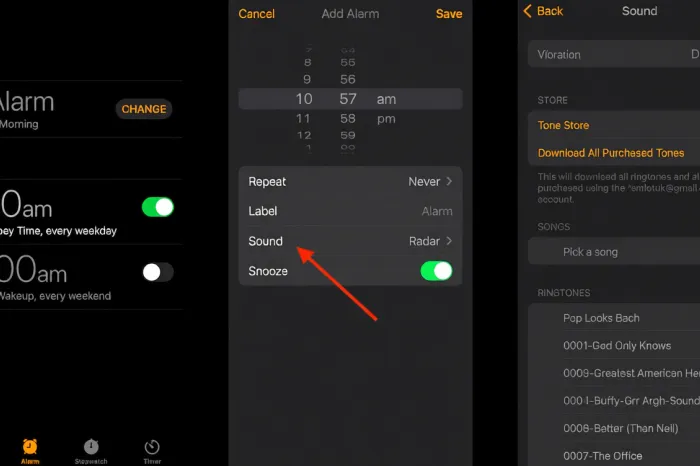
Many people prefer starting their mornings with music rather than a loud or harsh alarm. Setting your favorite song as an alarm may help you wake up in a better mood and make getting out of bed a little easier. Both smartphones and smart speakers can be customized to play a song of your choice to start the day.
For iPhone users, the process is simple. Open the Clock app and tap on the Alarm tab. To create a new alarm, press the plus sign or edit an existing one. Next, choose “Sound” and either download a tone from the iTunes Store or select from music in your Apple Music library. After that, set your preferred time and alarm settings. You can also add a name for your alarm to help you recognize it.
Android users also have options for waking up to music. On Samsung devices, go to the Clock app and access the Alarm tab. Here, users can create a new alarm or adjust a current one, then pick an alarm sound. You can select an app such as Spotify and choose a favorite song. For those with Pixel phones, a similar process applies. Open the Clock app, set your alarm, and select “Alarm sound.” You may pick songs from YouTube Music, Spotify, Pandora, or Calm. Google also offers the choice to record personal sounds for alarms.
Smart speaker owners can take advantage of the built-in virtual assistants for their morning routines. Instead of relying on a traditional alarm clock, users can direct their smart speaker to wake them up with a handpicked track or playlist. This can be set up through the speaker’s companion app on your smartphone, allowing you to choose specific songs or artists to start your day.
The flexibility of choosing how you wake up means that mornings can be more pleasant and personal. Whether you favor energetic pop, gentle acoustic tunes, or custom recordings, waking up with your own sound choices may help you feel refreshed as the new day begins.